
Last updated Oct 29, 2025.
OpenAI’s Game-Changing Open GPT Model - Deploy GPT-OSS on Qubrid AI GPUs
4 minutes read

Shubham Tribedi

The AI industry is evolving at lightning speed. Every month, we see breakthroughs in large language models (LLMs), generative AI, and machine learning research. But the latest release from OpenAI has created a true inflection point: GPT-OSS.
For the first time since GPT-2, OpenAI has released an open-weight GPT-style model that anyone can download, run locally, fine-tune, and extend into production systems.
GPT-OSS is available in two sizes:
GPT-OSS 20B → ~21B parameters, lightweight enough to run on high-end GPUs (16–24 GB VRAM)
GPT-OSS 120B → ~117B parameters, designed for enterprise-class GPUs like A100s and H100s
Developers now have an Apache-licensed GPT model offering strong reasoning and tool-use capabilities without vendor lock-in - but running it requires serious GPU power and setup.
The Problem: AI/ML Setup Still Wastes Time
Before you can even start experimenting with GPT-OSS, you need to:
Install and align PyTorch/TensorFlow with correct CUDA/cuDNN versions
Configure frameworks like Ollama, vLLM, or llama.cpp
Manage dependencies for fine-tuning and structured outputs
Scale from single GPU → multi-GPU clusters
This process can take hours or even days. For teams racing to prototype or launch, that’s a huge bottleneck.
The Qubrid AI Solution: Ready AI/ML Packages on GPU Virtual Machines
At Qubrid AI, we’ve solved this by offering ready-to-use AI/ML environments, optimized for GPU acceleration and available for instant deployment.
With Qubrid AI, you get:
Preinstalled environments → PyTorch, TensorFlow, RAPIDS, CUDA
Optimized stacks for training, inference, and fine-tuning
Scalability → move from 1 GPU to multi-GPU clusters easily
Faster time-to-value → deploy in minutes, not hours
Instead of wrestling with dependencies and drivers, focus on what matters - building AI applications.
Why GPT-OSS + Qubrid AI is a Perfect Match
Running GPT-OSS locally or on generic cloud setups is resource intensive. Qubrid AI provides exactly the infrastructure you need.
You can:
Spin up GPT-OSS 20B with Open WebUI in just a few clicks
Run experiments with Ollama integration
Fine-tune GPT-OSS on private datasets
Deploy at scale seamlessly
In short: Qubrid AI is the fastest way to explore GPT-OSS at scale.
Step-by-Step: Deploy GPT-OSS 20B on Qubrid AI
1. Go to the Qubrid Platform
Head over to AI/ML Templates under the GPU Compute section.

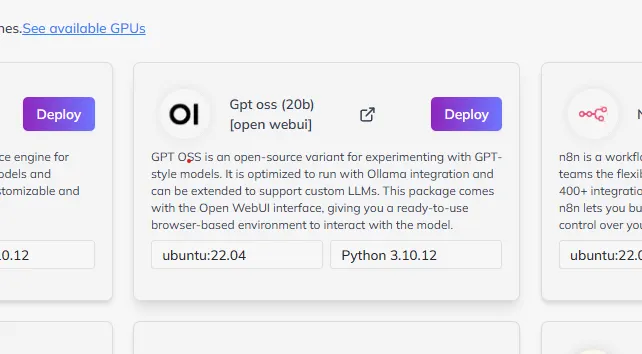
2. Find GPT-OSS (20B) [Open WebUI]
Currently, Qubrid AI supports the 20B model with a browser-ready interface. (120B model also live now!)
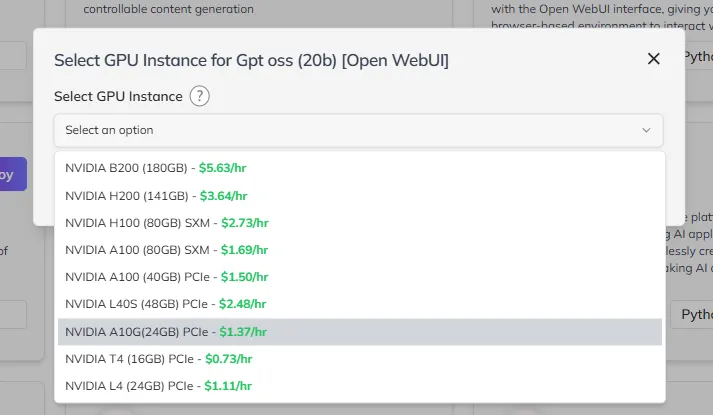
3. Choose your GPU
Select the right GPU type (A100, H100, or other available instances).
4. Select GPU Count & Root Disk
Allocate resources depending on your workload.

5. Enable SSH (Optional)
Toggle the SSH option, provide your public key, and gain full SSH access.

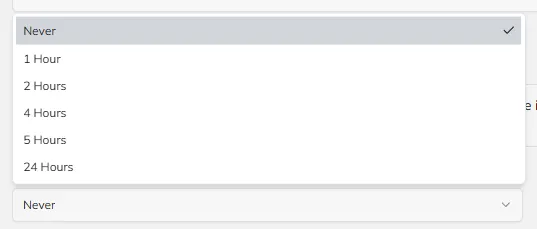
6. Set Autostop (Optional)
Configure the VM to automatically stop after a chosen period to save costs.
7. Click Launch
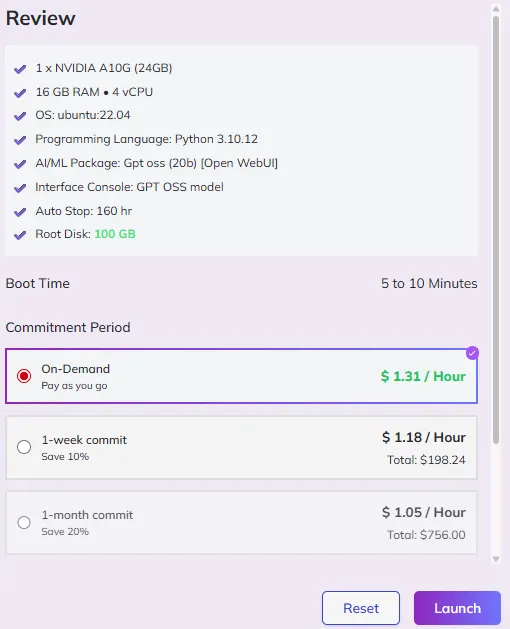
Launch VM
In under 5–10 minutes, you’ll have GPT-OSS 20B running with Open WebUI, ready to chat, test prompts, or fine-tune.
Example Use Cases
Here’s what you can build with GPT-OSS + Qubrid AI:
Researchers & Developers → fine-tune GPT-OSS for healthcare, finance, or legal datasets
AI Startups → prototype LLM-powered apps instantly
Enterprises → deploy internal AI assistants securely
Educators → use GPT-OSS in workshops or hackathons
DIY Setup vs Qubrid AI Deployment
DIY Setup | Qubrid AI Deployment |
8–12 hours of environment setup | Under 10 minutes |
Hard to source enterprise GPUs | On-demand A100s & H100s |
Manual cluster setup required | One-click scaling |
Pay for idle hardware | Pay-as-you-go with autostop |
Error-prone | Seamless browser-ready Open WebUI |
The difference is clear - Qubrid AI lets you skip friction and focus on innovation.
Why Qubrid AI is the Right Platform for GPT-OSS
Performance → Enterprise-grade GPUs tuned for AI workloads
Speed → GPT-OSS running in minutes
Scalability → Effortless distributed clusters
Flexibility → Prebuilt stacks or bring your own workflows
With GPT-OSS + Qubrid AI, you’re not just experimenting - you’re building production-ready AI.

What’s Next
Qubrid AI continues expanding its templates to include:
Pre-tuned GPT-OSS models for industries
Seamless LangChain and LlamaIndex integrations
One-click RAG pipelines and fine-tuning setups
Deploy GPT-OSS 20B on Qubrid AI GPU VMs today and start building the next generation of AI applications.